

Material Notification Shade
Catégorie : PersonnalisationVersion: 18.5.9.2
Taille:20.30MSystème d'exploitation : Android 5.1 or later
Promoteur:ZipoApps
 Télécharger
 Transformez l'interface utilisateur de votre appareil avec l'application Shade de notification des matériaux, un outil conçu pour améliorer votre centre de notification avec des fonctionnalités Android Oreo et des options de personnalisation approfondies. Cette application remplace votre panneau de notification par défaut par un menu de paramètres rapides élégant et sensible aux gestes, offrant une expérience unique et personnalisée qui élève votre interaction avec votre appareil.
Caractéristiques de l'ombre de notification des matériaux:
- Android Oreo Fonctionnalités: Material Notification Shade apporte les fonctionnalités sophistiquées d'Android Oreo à votre centre de notification, en veillant à ce que votre appareil se démarque avec une touche moderne.
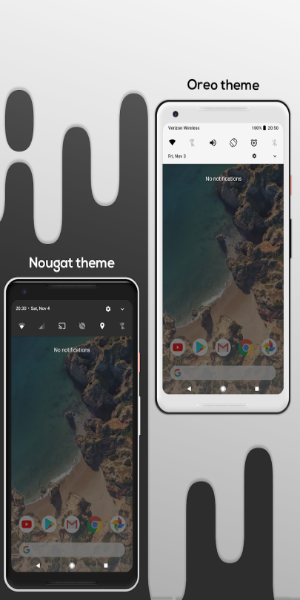
- Conception personnalisable: remplacez le panneau de notification d'origine par un panneau visuellement attrayant et hautement personnalisable. Choisissez parmi les thèmes inspirés de Nougat et Oreo, et colorez tous les éléments en fonction de votre style.
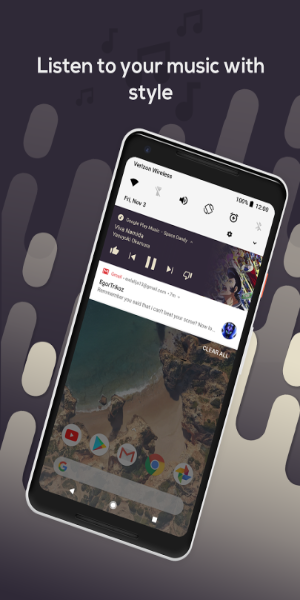
- Notifications puissantes: Gérez vos notifications sans effort avec une teinte de notification matérielle. Voir, lire, faire une pause ou rejeter les notifications avec facilité, en améliorant votre contrôle sur les alertes de votre appareil.
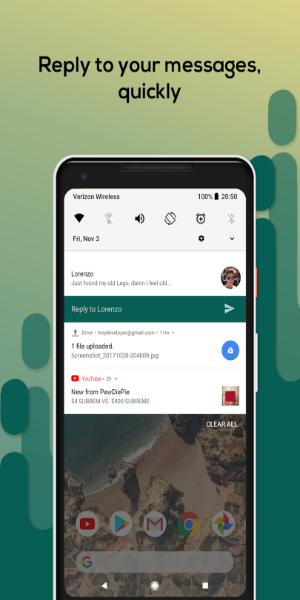
- Réponse rapide: profitez de la commodité de la fonctionnalité de réponse rapide, permettant des réponses instantanées aux messages sur les appareils Android exécutant la version 8.0 ou plus.
Conseils pour les utilisateurs:
- Personnaliser les cartes de notification: explorez les différents thèmes de la carte de notification tels que la lumière, le coloré et l'obscurité. Sélectionnez celui qui correspond le mieux à vos préférences et complète l'affichage de votre appareil.
- Personnalisez les paramètres rapides Panneau: Tapissez votre panneau de paramètres rapide en choisissant des couleurs uniques pour les icônes d'arrière-plan et de premier plan. Ajustez la couleur du curseur de luminosité et définissez même votre propre photo de profil pour apparaître dans l'ombre.
- Explorez les fonctionnalités de la version PRO: Passez à la version Pro pour personnaliser la disposition de la grille de votre panneau de paramètres rapides. Ajustez le nombre de colonnes et de lignes pour optimiser la disposition en fonction de vos besoins spécifiques.
Conception et expérience utilisateur
Design élégant et moderne
La Shade de notification matérielle offre un design contemporain qui améliore l'attrait visuel de votre centre de notification. Son design imite le style Android Oreo, offrant un look poli et cohérent qui s'intègre de manière transparente à l'esthétique de votre appareil.
Notifications personnalisables
Personnalisez votre panneau de notification avec une variété d'options de personnalisation. Ajustez la couleur, la transparence et la mise en page pour contrôler comment les notifications apparaissent et interagissent sur votre appareil.
Navigation en geste
L'application introduit la détection des gestes pour un accès rationalisé aux paramètres rapides. Un simple glissement vers le bas pour afficher les notifications active un menu de paramètres rapides personnalisé, vous permettant d'accéder aux fonctionnalités essentielles sans robinets supplémentaires.
Fonctionnalité améliorée
En remplaçant le panneau de notification par défaut, la teinte de notification des matériaux offre des fonctionnalités améliorées et une expérience utilisateur plus intuitive. Profitez des transitions plus lisses et des interactions plus réactives pour une meilleure performance globale.
Intégration transparente
La teinte de notification des matériaux s'intègre en douceur aux paramètres et applications existants de votre appareil, assurant une transition transparente du panneau de notification du stock. Cette application améliore la convivialité sans perturber votre configuration actuelle.
Quoi de neuf
- Ajout de panneaux étendus pour WiFi et DND
- Autres améliorations et corrections générales


Pas de Gears of War : E-Day à l’Xbox 2025, mais lancement confirmé en 2026

GTA 6 repoussé à 2026 : les meilleurs jeux de 2025
- Les PlayStation Days of Play incluent une première réduction sur la PS5 Pro et de nouveaux bundles de consoles PS5 Il y a 1 semaines
- XD Inc dévoile Heartopia, un jeu de simulation inspiré d’Animal Crossing: New Horizons Il y a 1 semaines
- Tour Dominion : Construisez Votre Propre Champ de Bataille Défensif Il y a 1 semaines
- Destiny 2 dévoile son plan de crossover avec Star Wars Il y a 1 semaines
- Love, to Livy – Devinez l'énigme croisée - Essayez des guides Il y a 1 semaines
- Les zones sauvages de Pokémon Go font leur retour cette année lors d’un événement à venir Il y a 2 semaines
- Économisez 40 % sur le Wolfbox Mega Flow 100, nettoyeur d'air électrique sans fil avec charge USB Il y a 2 semaines
- Anneau de Feu : Prometheus fait surface en Chine avec une bêta pleine de mystères Il y a 2 semaines
- Le matchmaking de Battlefield 6 intégrera le SBMM, ainsi que la latence, la localisation et la disponibilité des serveurs Il y a 2 semaines
-

La vie à la mode / 3.17.0 / 10.52M
Télécharger -

Personnalisation / 1.0.0 / by DigitalPowerDEV / 11.10M
Télécharger -

Outils / 9.9.7 / 130.54M
Télécharger -

Lecteurs et éditeurs vidéo / v1.02 / by TateSAV / 13.80M
Télécharger -

La vie à la mode / 1.5 / by BetterPlace Safety Solutions Pvt Ltd / 9.60M
Télécharger -

La vie à la mode / 13.1 / 5.66M
Télécharger -

La vie à la mode / v2.3.0 / by iMyFone / 26.39M
Télécharger -

Bureaux commerciaux / 2.8 / 10.16M
Télécharger
-
 Tous les mots de passe et les combinaisons de cadenas dans les enregistrements perdus: Bloom et Rage
-
 30 meilleurs mods pour les sims 2
-
 Meilleur Android PS1 Emulator – Quel émulateur PlayStation dois-je utiliser ?
-
 Des images divulguées dévoilent l'épopée mythique : Black Myth : Wukong
-
 Dates et calendrier du Tokyo Game Show 2024 : tout ce que nous savons jusqu'à présent
-
 Android accueille le jeu de style "Dynasty Legends", "Otherworld Three Kingdoms"