

Screen Recorder+Video Recorder
Category : ToolsVersion: Last updated on Jun 4, 20241. Support custom configuration of floating ball function2. Support custom configuration of brush bar functions3. Support more themes for you to choose from
Size:29.30MOS : Android 5.1 or later
Developer:Cut MP3
 Download
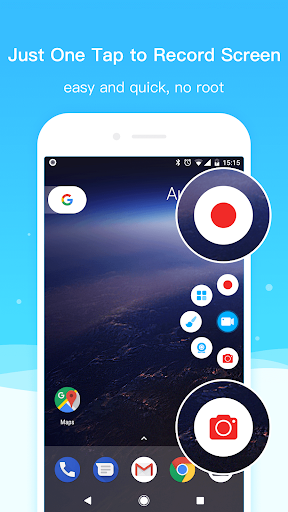
 Unlock the full potential of your screen recording needs with Super Screen Recorder. Designed for both casual users and professionals, this powerful app provides all the tools you need to capture, edit, and share your screen recordings with ease. Whether you're creating tutorials, recording gameplay, or capturing important moments, Super Screen Recorder delivers high-quality results every time.
Features of Super Screen Recorder:
❤ Unlimited screen recording time with no watermark.
❤ Professional screen recording with high-definition video quality.
❤ RTMP live streaming to platforms like YouTube, Facebook, Periscope, and Twitch.
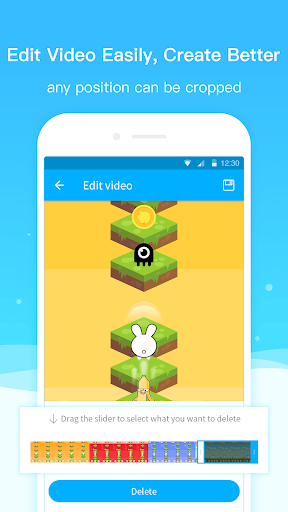
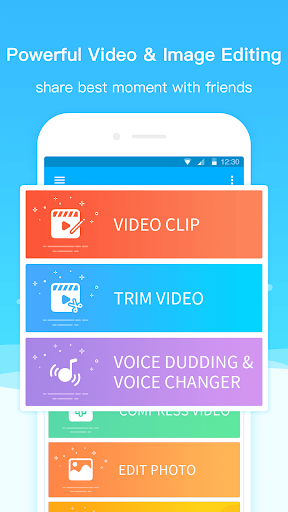
❤ Powerful video editing functions including trimming, rotating, splicing, compressing, and adding background music.
❤ Screenshot and image editing tools for creating beautiful pictures.
❤ Various customization options for screen recording area, brush styles, and floating text.
MOD Info:
- Pro Unlocked
⭐ High-Quality Screen Recording
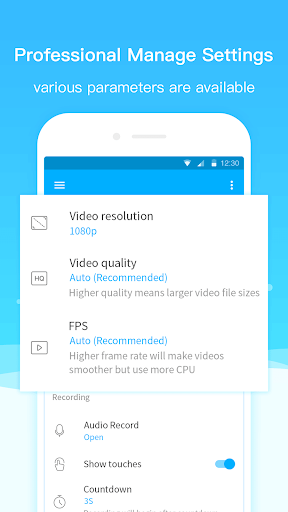
Super Screen Recorder ensures that your recordings are of the highest quality. Capture your screen in HD resolution with smooth and clear visuals. The app supports various recording resolutions and frame rates, allowing you to customize your recordings to suit your needs, whether it's for professional tutorials or casual video sharing.
⭐ Easy-To-Use Interface
Navigate Super Screen Recorder with ease thanks to its user-friendly interface. The app's intuitive design makes it simple to start, stop, and manage your recordings. With just a few taps, you can capture your screen and access advanced settings without any hassle.
⭐ Customizable Recording Settings
Tailor your recording experience with Super Screen Recorder's customizable settings. Choose from a range of options including resolution, frame rate, and bit rate to achieve the perfect balance between quality and file size. The app also allows you to adjust recording duration and enable features like screen touches and annotations.
▶ What's New in the Latest Version:
Last updated on Jun 4, 2024
Support custom configuration of floating ball function
Support custom configuration of brush bar functions
Support more themes for you to choose from




- Destiny 2 Reveals Star Wars Crossover Plan 1 weeks ago
- Love, to Livy Crossword Clue - Try Hard Guides 1 weeks ago
- Pokémon Go\'s Wild Areas make a return this year in upcoming event 2 weeks ago
- Save 40% Off the Wolfbox Mega Flow 100 Cordless Electric Air Duster with USB Charging 2 weeks ago
- Ring of Fire: Prometheus surfaces in China with a beta full of mystery 2 weeks ago
- Battlefield 6 Matchmaking Will Include SBMM — Among Other Things Like Ping, Location, And Server Availability 3 weeks ago
-

Personalization / 1.0.0 / by DigitalPowerDEV / 11.10M
Download -

Lifestyle / 1.5 / by BetterPlace Safety Solutions Pvt Ltd / 9.60M
Download -

Video Players & Editors / v1.02 / by TateSAV / 13.80M
Download -

Productivity / 2.8 / 10.16M
Download




-
 All Passwords and Padlock Combinations in Lost Records: Bloom and Rage
-
 30 best mods for The Sims 2
-
 Best Android PS1 Emulator - Which PlayStation Emulator Should I Use?
-
 Leaked Footage Unveils Mythical Epic: Black Myth: Wukong
-
 Tokyo Game Show 2024 Dates and Schedule: Everything We Know So Far
-
 Android welcomes "Dynasty Legends" style game, "Otherworld Three Kingdoms"