


Viso FBT
Category : ToolsVersion: v1.12
Size:75.29MOS : Android 5.1 or later
Developer:RoarWild Studio
 Download
 Get ready for an exceptional full-body tracking experience with Viso FBT! Say goodbye to bulky physical trackers and immerse yourself in VR using just your smartphone camera. Best of all, this cutting‑edge solution is completely free and incredibly easy to use, opening up full‑body motion capture to every VR enthusiast. Step into the future of VR interaction with Viso FBT today!
Design and User Experience:
Intuitive Design
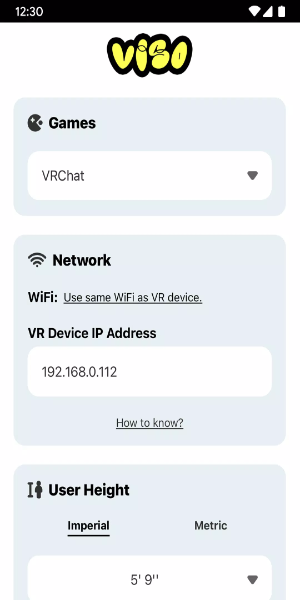
Built with a user‑first approach, Viso FBT simplifies full‑body tracking setup and operation in virtual reality. The app cleverly transforms your smartphone camera into a motion sensor, removing the need for extra hardware. Its straightforward interface guides you through smooth calibration, making the setup process quick and hassle‑free.
Seamless Integration
Viso FBT integrates effortlessly with major VR platforms such as VRChat on Quest and SteamVR. By using your smartphone camera, it captures and translates your body's subtle motions into the virtual space. This broad compatibility ensures you get flexible performance across a range of VR setups.
Real-Time Motion Capture
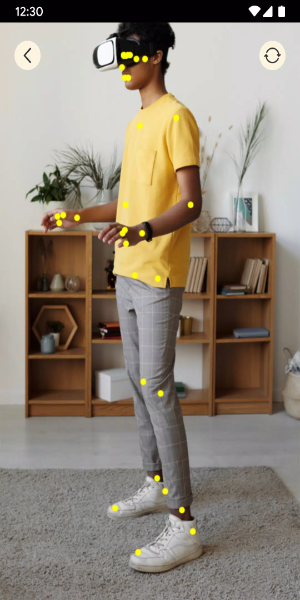
Enjoy real‑time motion capture at a new level. Viso FBT accurately tracks movement from your elbows down to your feet, allowing precise avatar animations in VR. Whether dancing, gesturing, or moving around, your actions are mirrored faithfully for deeper immersion and interaction.
User-Friendly Interface
Viso FBT is designed for ease of use. The interface is clean and accessible, with step‑by‑step calibration and setup guides. You can fine‑tune settings effortlessly to optimize your experience, integrating full‑body tracking smoothly into your virtual sessions.
Enhanced Immersion
Viso FBT elevates your VR immersion by enabling natural interaction in the digital world. Through smartphone‑based motion tracking, it closes the gap between the real and virtual, offering an engaging and accessible experience—no matter your setup or familiarity with VR.
Powerful Functions of Viso FBT:
Precise Motion Tracking
Viso FBT delivers accurate motion tracking powered solely by your smartphone camera. It captures movements from elbows to feet and converts them into lifelike avatar animations in environments like VRChat on Quest and SteamVR. This precision allows for a smooth, responsive VR experience without extra trackers.
Real-Time Avatar Animations
Your avatar moves as you do in real time with Viso FBT. It captures gestures, poses, and locomotion, translating them instantly into the virtual world. Whether you are dancing, walking, or reaching for objects, your avatar responds naturally for a truly immersive and lively VR session.
User-Friendly Setup
Viso FBT features an easy setup process that gets you into full‑body tracking quickly. Simply calibrate your smartphone camera for optimal accuracy. With clear on‑screen instructions, even beginners can configure the app and start tracking in minutes.
Multi-Platform Compatibility
Viso FBT works across multiple VR platforms, including VRChat on Quest and SteamVR. Whether using a standalone headset or a PC‑based system, the app integrates smoothly, bringing full‑body motion tracking to a wide variety of VR environments.
Free and Accessible
Viso FBT is free to use, giving a broad audience access to premium motion capture. Skip costly trackers—this app provides an affordable option for immersive full‑body experiences, making advanced VR interaction available to everyone.
How to Install:
- Download the APK: Get the APK file from a trusted source like 40407.com.
- Enable Unknown Sources: Go to your device’s Security settings and allow app installations from unknown sources.
- Install the APK: Find the downloaded APK file and follow the on‑screen steps.
- Launch the App: Open Viso FBT and start enjoying full‑body VR tracking.






- Destiny 2 Reveals Star Wars Crossover Plan 1 weeks ago
- Love, to Livy Crossword Clue - Try Hard Guides 1 weeks ago
- Pokémon Go\'s Wild Areas make a return this year in upcoming event 2 weeks ago
- Save 40% Off the Wolfbox Mega Flow 100 Cordless Electric Air Duster with USB Charging 2 weeks ago
- Ring of Fire: Prometheus surfaces in China with a beta full of mystery 2 weeks ago
- Battlefield 6 Matchmaking Will Include SBMM — Among Other Things Like Ping, Location, And Server Availability 2 weeks ago
-

Personalization / 1.0.0 / by DigitalPowerDEV / 11.10M
Download -

Video Players & Editors / v1.02 / by TateSAV / 13.80M
Download -

Lifestyle / 1.5 / by BetterPlace Safety Solutions Pvt Ltd / 9.60M
Download -

Productivity / 2.8 / 10.16M
Download




-
 All Passwords and Padlock Combinations in Lost Records: Bloom and Rage
-
 30 best mods for The Sims 2
-
 Best Android PS1 Emulator - Which PlayStation Emulator Should I Use?
-
 Leaked Footage Unveils Mythical Epic: Black Myth: Wukong
-
 Tokyo Game Show 2024 Dates and Schedule: Everything We Know So Far
-
 Android welcomes "Dynasty Legends" style game, "Otherworld Three Kingdoms"