


One Touch Lock Screen
Categoría : HerramientasVersión: 3.4
Tamaño:4.00MSO : Android 5.1 or later
Revelador:IDOAI
 Descargar
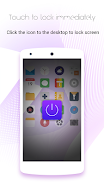
 Presentamos One Touch Lock Screen, la solución definitiva para bloquear su teléfono sin esfuerzo con un solo clic. Diga adiós a buscar el botón de encendido: simplemente toque el ícono One Touch en su escritorio y su teléfono quedará bloqueado de forma segura en un instante. Congela tu pantalla cuando quieras con esta genial aplicación de pantalla de bloqueo. Descansa tranquilo sabiendo que tu botón de encendido está protegido con One Touch. Para cancelar la aplicación, simplemente siga estos pasos: vaya a Configuración, luego Seguridad, Administradores de dispositivos, seleccione One Touch y haga clic en Desactivar. Descárguelo ahora y experimente la comodidad de One Touch Lock Screen.
Características de la aplicación:
- Bloqueo instantáneo: con One Touch, puede bloquear fácilmente la pantalla de su teléfono simplemente haciendo clic en el icono. Ya no es necesario presionar el botón de encendido.
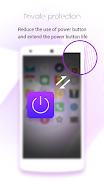
- Protege el botón de encendido: esta aplicación está diseñada para proteger el botón de encendido de su teléfono. Al usar One Touch, puede reducir el desgaste de este importante botón, extendiendo su vida útil.
- Congelación conveniente: One Touch no solo bloquea la pantalla, sino que también le permite congelarla en cualquier momento. Esto puede resultar útil cuando desea pausar un vídeo o acceder rápidamente a otra aplicación sin desbloquear todo el teléfono.
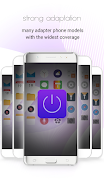
- Fácil de usar: para bloquear la pantalla, todo lo que necesita hacer es hacer clic en el ícono One Touch. Sin pasos complicados ni menús para navegar. Es una experiencia simple e intuitiva.
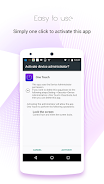
- Permisos seguros: One Touch utiliza el permiso del Administrador del dispositivo, lo que garantiza que solo las personas autorizadas puedan modificar o desactivar la aplicación. Esto agrega una capa adicional de seguridad a su dispositivo.
- Desinstalación sencilla: si alguna vez decide eliminar One Touch de su teléfono, es un proceso sencillo. Simplemente vaya a Configuración, luego Seguridad, Administradores de dispositivos, seleccione One Touch y desactívelo. Solo siguiendo estos pasos podrás cancelar la aplicación.
En conclusión, One Touch es una aplicación imprescindible para cualquiera que busque bloquear rápidamente la pantalla de su teléfono y proteger el botón de encendido. Su comodidad, simplicidad y seguridad adicional lo convierten en la elección perfecta para los usuarios. Haga clic ahora para descargar y experimentar los beneficios de One Touch Lock Screen.


This app is a lifesaver! So much faster than using the power button. Simple, effective, and exactly what I needed. Highly recommend!
Funciona bien, pero a veces se bloquea la pantalla sin querer. Necesita alguna mejora en la sensibilidad.
Pratique, mais l'icône est un peu trop grande à mon goût. Je préfère les applications plus discrètes.

Sin Gears of War: E-Day en Xbox 2025, pero lanzamiento confirmado para 2026

GTA 6 retrasado a 2026: Los mejores juegos de 2025
- La venta PlayStation Days of Play incluye el primer descuento en la PS5 Pro y nuevos paquetes de la consola PS5 Hace 1 semanas
- XD Inc. Presenta Heartopia, un simulador al estilo de Animal Crossing: New Horizons Hace 1 semanas
- Dominio de la Torre: Construye Tu Propia Zona de Defensa en el Campo de Batalla Hace 1 semanas
- Destiny 2 revela su colaboración con Star Wars Hace 1 semanas
- Pista de crucigrama para "Love" de Livy - Try Hard Guides Hace 1 semanas
- Las Zonas Silvestres de Pokémon Go regresan este año en un evento próximo Hace 2 semanas
- Ahorra un 40% en el Wolfbox Mega Flow 100, soplador eléctrico inalámbrico con carga USB Hace 2 semanas
- Anillo de Fuego: Prometheus emerge en China con un beta lleno de misterio Hace 2 semanas
- El matchmaking de Battlefield 6 incluirá SBMM, además de ping, ubicación y disponibilidad del servidor Hace 2 semanas
-

Vida de moda / 3.17.0 / 10.52M
Descargar -

Personalización / 1.0.0 / by DigitalPowerDEV / 11.10M
Descargar -

Herramientas / 9.9.7 / 130.54M
Descargar -

Reproductores y editores de vídeo / v1.02 / by TateSAV / 13.80M
Descargar -

Vida de moda / 1.5 / by BetterPlace Safety Solutions Pvt Ltd / 9.60M
Descargar -

Vida de moda / 13.1 / 5.66M
Descargar -

Vida de moda / v2.3.0 / by iMyFone / 26.39M
Descargar -

Oficina Comercial / 2.8 / 10.16M
Descargar
-
 Todas las contraseñas y combinaciones de candados en discos perdidos: Bloom y Rage
-
 30 mejores modificaciones para los Sims 2
-
 Mejor Android PS1 Emulator: ¿Qué emulador de PlayStation debo usar?
-
 Imágenes filtradas revelan una epopeya mítica: Black Myth: Wukong
-
 Fechas y calendario del Tokyo Game Show 2024: todo lo que sabemos hasta ahora
-
 Android da la bienvenida al juego estilo "Dynasty Legends", "Otherworld Three Kingdoms"