


One Touch Lock Screen
Catégorie : OutilsVersion: 3.4
Taille:4.00MSystème d'exploitation : Android 5.1 or later
Promoteur:IDOAI
 Télécharger
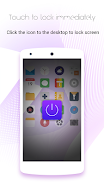
 Présentation de One Touch Lock Screen, la solution ultime pour verrouiller votre téléphone sans effort en un seul clic. Dites adieu à la recherche du bouton d'alimentation : appuyez simplement sur l'icône One Touch sur votre bureau et votre téléphone sera verrouillé en toute sécurité en un instant. Gelez votre écran quand vous le souhaitez avec cette application sympa pour écran de verrouillage. Soyez tranquille en sachant que votre bouton d'alimentation est protégé avec One Touch. Pour annuler l'application, suivez simplement ces étapes : accédez à Paramètres, puis Sécurité, Administrateurs de périphériques, sélectionnez One Touch et cliquez sur Désactiver. Téléchargez maintenant et découvrez la commodité de One Touch Lock Screen.
Caractéristiques de l'application :
- Verrouillage instantané : avec One Touch, vous pouvez facilement verrouiller l'écran de votre téléphone en cliquant simplement sur l'icône. Plus besoin d'appuyer sur le bouton d'alimentation.
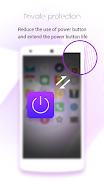
- Protège le bouton d'alimentation : Cette application est conçue pour protéger le bouton d'alimentation de votre téléphone. En utilisant One Touch, vous pouvez réduire l'usure de ce bouton important, prolongeant ainsi sa durée de vie.
- Gelage pratique : One Touch verrouille non seulement votre écran, mais il vous permet également de le geler à tout moment. Cela peut être utile lorsque vous souhaitez mettre une vidéo en pause ou accéder rapidement à une autre application sans déverrouiller tout le téléphone.
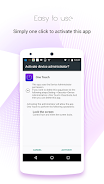
- Facile à utiliser : Pour verrouiller votre écran, il vous suffit de cliquer sur l'icône One Touch. Pas d'étapes ou de menus compliqués à parcourir. C'est une expérience simple et intuitive.
- Autorisations sécurisées : One Touch utilise l'autorisation de l'administrateur de l'appareil, garantissant que seules les personnes autorisées peuvent modifier ou désactiver l'application. Cela ajoute une couche de sécurité supplémentaire à votre appareil.
- Désinstallation facile : si jamais vous décidez de supprimer One Touch de votre téléphone, le processus est simple. Allez simplement dans Paramètres, puis Sécurité, Administrateurs de périphériques, sélectionnez One Touch et désactivez-le. Ce n'est qu'en suivant ces étapes que vous pourrez annuler l'application.
En conclusion, One Touch est une application incontournable pour tous ceux qui cherchent à verrouiller rapidement l'écran de leur téléphone et à protéger le bouton d'alimentation. Sa commodité, sa simplicité et sa sécurité supplémentaire en font le choix idéal pour les utilisateurs. Cliquez maintenant pour télécharger et profiter des avantages de One Touch Lock Screen.


This app is a lifesaver! So much faster than using the power button. Simple, effective, and exactly what I needed. Highly recommend!
Funciona bien, pero a veces se bloquea la pantalla sin querer. Necesita alguna mejora en la sensibilidad.
Pratique, mais l'icône est un peu trop grande à mon goût. Je préfère les applications plus discrètes.


Pas de Gears of War : E-Day à l’Xbox 2025, mais lancement confirmé en 2026

GTA 6 repoussé à 2026 : les meilleurs jeux de 2025
- Les PlayStation Days of Play incluent une première réduction sur la PS5 Pro et de nouveaux bundles de consoles PS5 Il y a 1 semaines
- XD Inc dévoile Heartopia, un jeu de simulation inspiré d’Animal Crossing: New Horizons Il y a 1 semaines
- Tour Dominion : Construisez Votre Propre Champ de Bataille Défensif Il y a 1 semaines
- Destiny 2 dévoile son plan de crossover avec Star Wars Il y a 1 semaines
- Love, to Livy – Devinez l'énigme croisée - Essayez des guides Il y a 1 semaines
- Les zones sauvages de Pokémon Go font leur retour cette année lors d’un événement à venir Il y a 2 semaines
- Économisez 40 % sur le Wolfbox Mega Flow 100, nettoyeur d'air électrique sans fil avec charge USB Il y a 2 semaines
- Anneau de Feu : Prometheus fait surface en Chine avec une bêta pleine de mystères Il y a 2 semaines
- Le matchmaking de Battlefield 6 intégrera le SBMM, ainsi que la latence, la localisation et la disponibilité des serveurs Il y a 2 semaines
-

La vie à la mode / 3.17.0 / 10.52M
Télécharger -

Personnalisation / 1.0.0 / by DigitalPowerDEV / 11.10M
Télécharger -

Outils / 9.9.7 / 130.54M
Télécharger -

Lecteurs et éditeurs vidéo / v1.02 / by TateSAV / 13.80M
Télécharger -

La vie à la mode / 1.5 / by BetterPlace Safety Solutions Pvt Ltd / 9.60M
Télécharger -

La vie à la mode / 13.1 / 5.66M
Télécharger -

La vie à la mode / v2.3.0 / by iMyFone / 26.39M
Télécharger -

Bureaux commerciaux / 2.8 / 10.16M
Télécharger
-
 Tous les mots de passe et les combinaisons de cadenas dans les enregistrements perdus: Bloom et Rage
-
 30 meilleurs mods pour les sims 2
-
 Meilleur Android PS1 Emulator – Quel émulateur PlayStation dois-je utiliser ?
-
 Des images divulguées dévoilent l'épopée mythique : Black Myth : Wukong
-
 Dates et calendrier du Tokyo Game Show 2024 : tout ce que nous savons jusqu'à présent
-
 Android accueille le jeu de style "Dynasty Legends", "Otherworld Three Kingdoms"