


TAMRON Lens Utility Mobile
Category : PhotographyVersion: 4.0.1
Size:12.30MOS : Android 5.1 or later
Developer:TAMRON
 Download
 Elevate your photography and video skills with the TAMRON Lens Utility Mobile app, designed for Android users with select TAMRON lenses featuring a USB Type-C port. This innovative app empowers you to fine-tune functions, update firmware, and even remotely operate your lens directly from your smartphone. With capabilities such as Digital Follow Focus (DFF) for precise focus and aperture control, extensive lens customization options, and tethered remote control features, this app unlocks a realm of creative opportunities for both photographers and videographers. Seize the opportunity to enhance your visual storytelling—download the TAMRON Lens Utility Mobile app today!
Features of TAMRON Lens Utility Mobile:
❤ DFF (Digital Follow Focus)
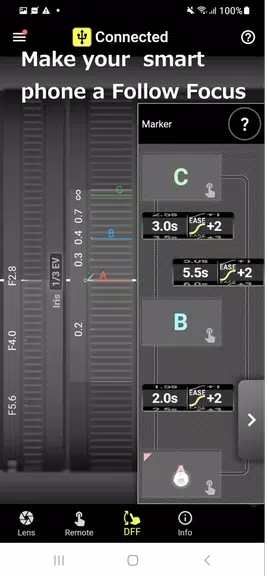
- Seamlessly control focus and aperture by simply scrolling the ring on your smartphone screen.
- Utilize the Focus Stopper to restrict the manual focus (MF) travel range for more precise control.
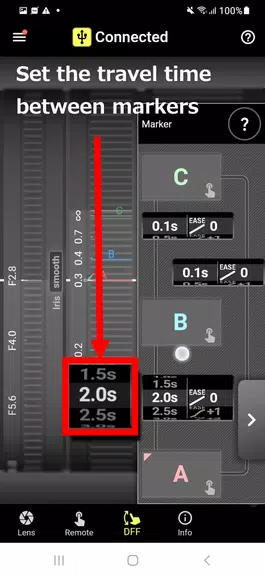
- Employ the FC Marker for manual or automatic focus shifting, enhancing your focus transitions.
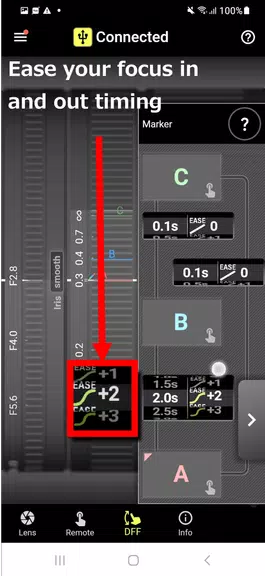
- Use FC Ease for smooth, gradual focus transitions, perfect for video work.
❤ Lens Customization
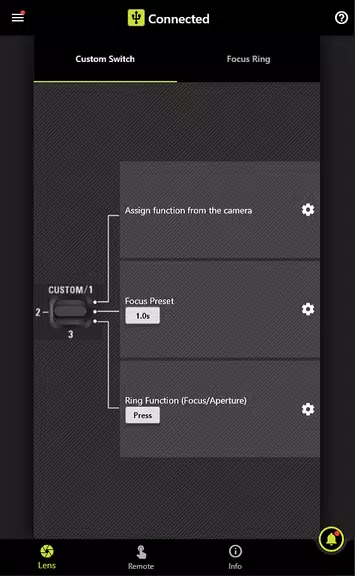
- Personalize the Custom Switch or Focus Set Button to match your preferred shooting style.
- Effortlessly shift focus between preset positions for quick adjustments during shoots.
- Choose between AF (Auto Focus) and MF (Manual Focus) functions to suit your needs.
- Toggle the Focus Ring function between focus and aperture adjustment for versatile control.
❤ Tethered Remote Control
- Configure dedicated features for smartphone tethered control, enhancing your shooting workflow.
- Make use of functions like A-B Focus and Focus Preset for a more streamlined shooting experience.
Tips for Users:
❤ Experiment with DFF: Dive into the DFF function to gain more control over focus and aperture, perfecting your shots with ease.
❤ Customize Your Lens: Leverage the lens customization options to tailor the settings to your unique shooting style, maximizing your creative potential.
❤ Utilize Tethered Remote Control: Explore the tethered control features for a seamless and efficient shooting experience, keeping you in control from your smartphone.
Conclusion:
The TAMRON Lens Utility Mobile app is your gateway to enhancing your photography and video experience with compatible TAMRON lenses. From the precision of DFF for focus and aperture control to the flexibility of lens customization options, this app offers a wealth of creative possibilities to meet your shooting needs. Moreover, the tethered remote control feature provides convenient smartphone control of your lens, making it an essential tool for any photographer or videographer. Download the TAMRON Lens Utility Mobile app now to elevate your photography to new heights.





- Destiny 2 Reveals Star Wars Crossover Plan 1 weeks ago
- Love, to Livy Crossword Clue - Try Hard Guides 1 weeks ago
- Pokémon Go\'s Wild Areas make a return this year in upcoming event 2 weeks ago
- Save 40% Off the Wolfbox Mega Flow 100 Cordless Electric Air Duster with USB Charging 2 weeks ago
- Ring of Fire: Prometheus surfaces in China with a beta full of mystery 2 weeks ago
- Battlefield 6 Matchmaking Will Include SBMM — Among Other Things Like Ping, Location, And Server Availability 2 weeks ago
-

Personalization / 1.0.0 / by DigitalPowerDEV / 11.10M
Download -

Video Players & Editors / v1.02 / by TateSAV / 13.80M
Download -

Lifestyle / 1.5 / by BetterPlace Safety Solutions Pvt Ltd / 9.60M
Download -

Productivity / 2.8 / 10.16M
Download




-
 All Passwords and Padlock Combinations in Lost Records: Bloom and Rage
-
 30 best mods for The Sims 2
-
 Best Android PS1 Emulator - Which PlayStation Emulator Should I Use?
-
 Leaked Footage Unveils Mythical Epic: Black Myth: Wukong
-
 Tokyo Game Show 2024 Dates and Schedule: Everything We Know So Far
-
 Android welcomes "Dynasty Legends" style game, "Otherworld Three Kingdoms"