>  ニュース >  Balatro デバッグ メニュー ガイド: 隠されたチートを解き放つ

Balatro デバッグ メニュー ガイド: 隠されたチートを解き放つ

Authore: Ameliaアップデート:Jan 11,2025

Balatro: チートとデバッグ メニューの力を解き放つ

2024 Game Awards でセンセーションを巻き起こした Balatro は、その革新的なゲームプレイと無限のリプレイ性で世界中のゲーマーを魅了しました。 その仕組みをマスターするのはやりがいがありますが、一部のプレイヤーは新たな視点を求めるかもしれません。 このガイドでは、Balatro の組み込み開発者デバッグ メニューとチートにアクセスして利用する方法を示し、実績を維持しながら MOD に代わる強力な代替手段を提供します。

クイックリンク

Balatro チートメニューへのアクセス
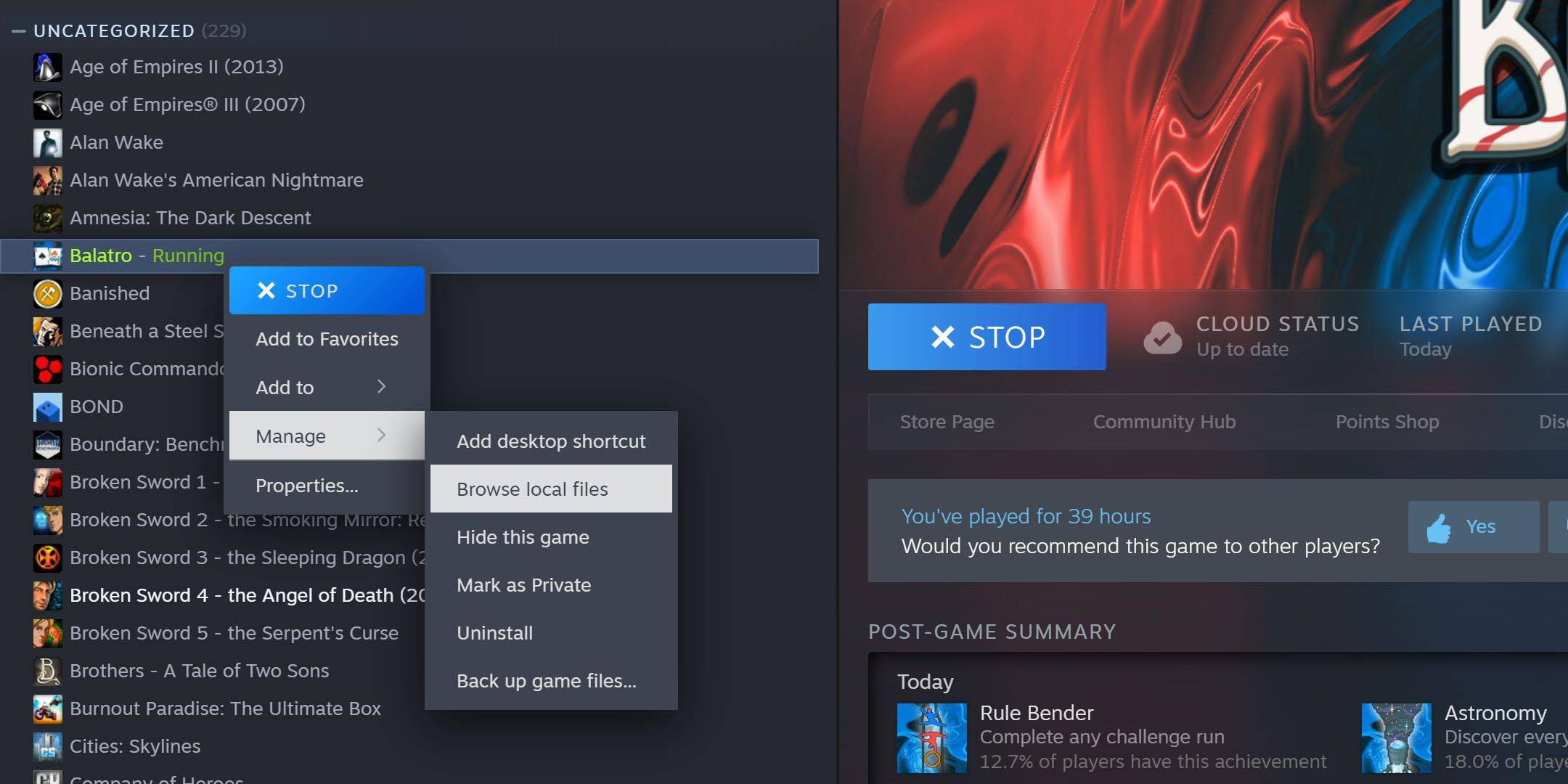
Balatro のデバッグ メニューを有効にするには、無料のオープンソース 7-Zip ソフトウェアが必要です。 Balatro インストール ディレクトリ (通常は C:\Program Files (x86)\Steam\steamapps\common\Balatro) を見つけます。見つからない場合は、Steam ライブラリに移動し、Balatro を右クリックして、[管理]、[ローカル ファイルの参照] の順に選択します。
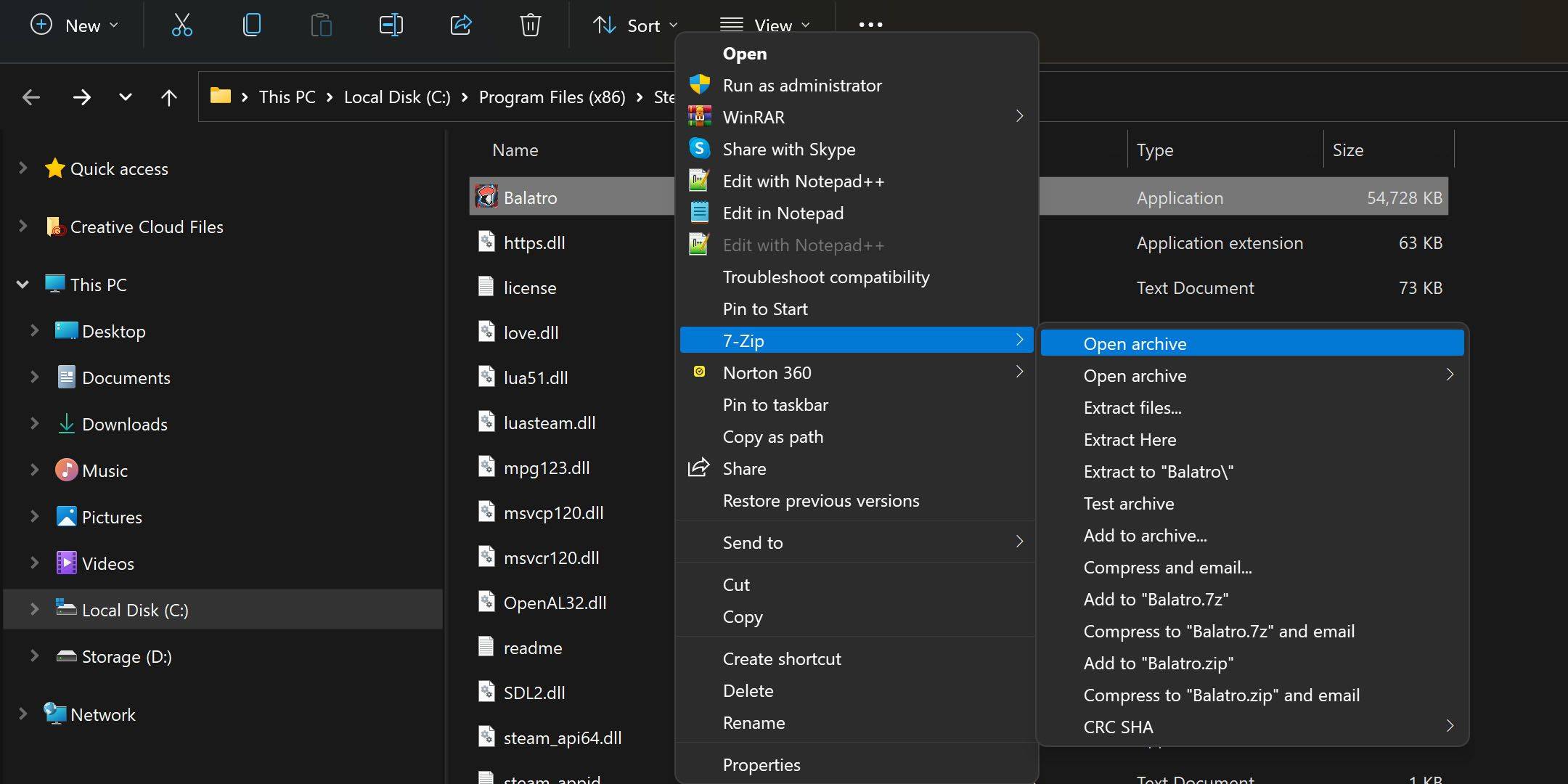
Balatro.exeを右クリックし、7-Zip を使用してアーカイブを開きます (このオプションは [その他のオプションを表示] の下にある場合があります)。 conf.lua を見つけて、テキスト エディタ (メモ帳など) で開きます。
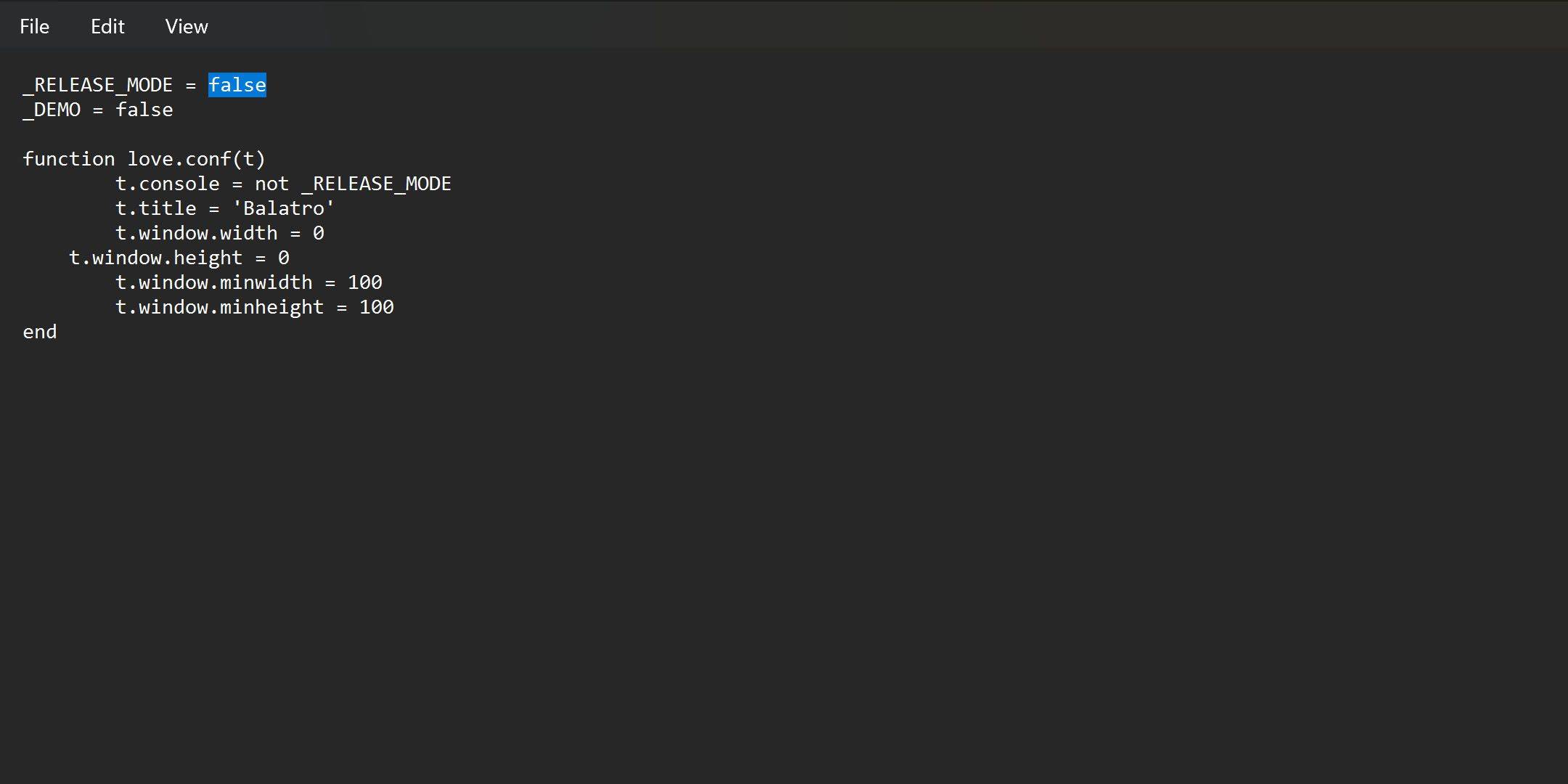
_RELEASE_MODE = true_RELEASE_MODE = false に変更し、変更を保存します。保存できない場合は、conf.luaをデスクトップに解凍し、変更を加えて元のファイルと置き換えてください。 ゲームプレイ中に Tab キーを押し続けると、デバッグ メニューがアクティブになるようになりました。 チートを無効にするには、_RELEASE_MODE パラメーターを true に戻します。

Balatro デバッグ メニューをマスターする
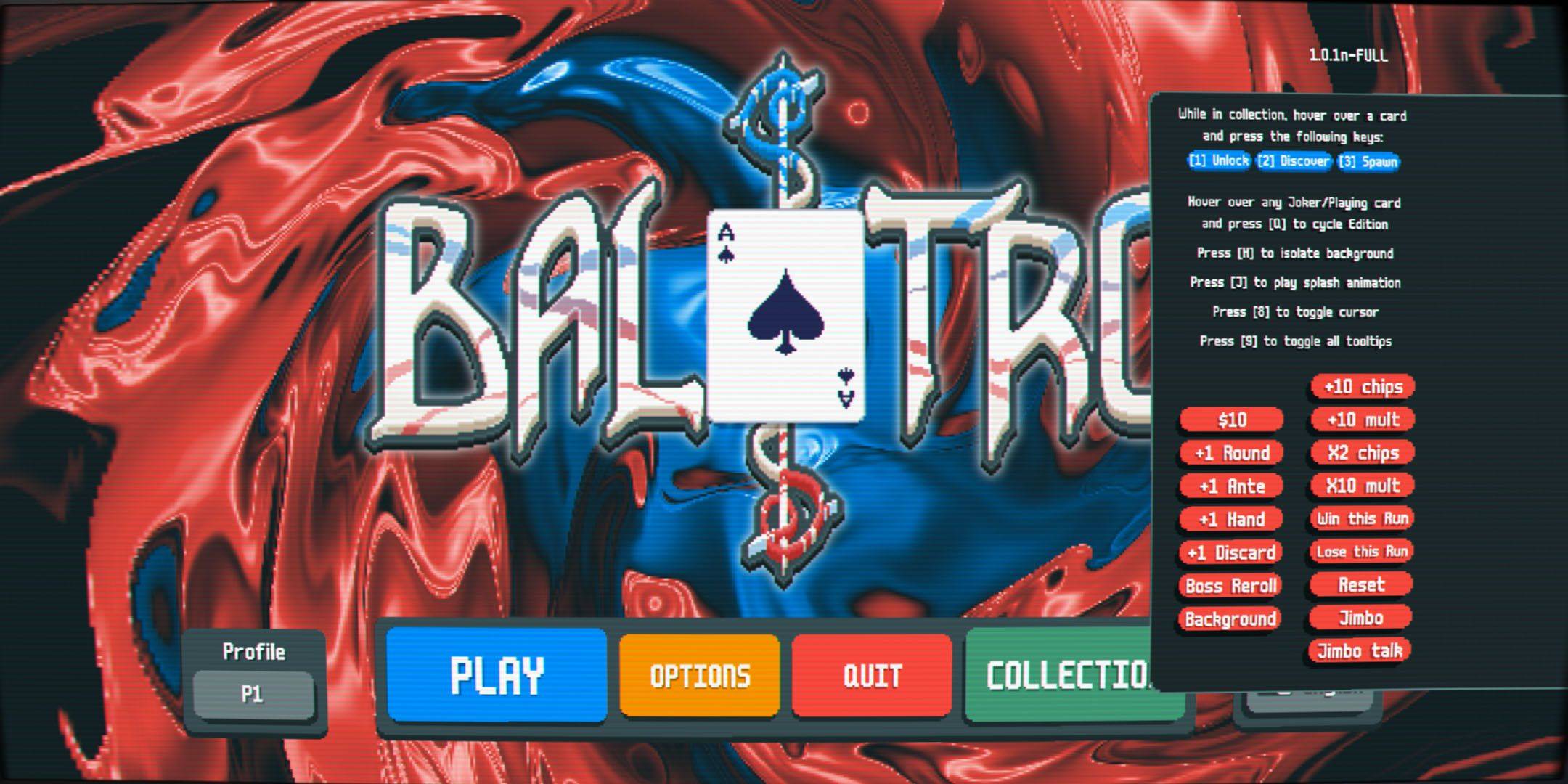
Balatro チート メニューは直感的です。マウスを移動して「1」を押すと、収集品のロックが解除されます。ホバーして「3」を押すとジョーカーが出現します。最初は 5 つのジョーカーに制限されていましたが、手の中のジョーカーで「Q」を four 回押すと、それがマイナスに変換され、実質的に無制限のジョーカーが許可されます。

Balatro チートの完全なリスト (タブを押してアクティブ化します)

チート/キー 効果 1収集品のロックを解除します(ホバリング中) 2収集品を発見する(ホバリング中) 3収集品を生成する(ホバリング中に) Qジョーカーエディションを変更(手持ちでホバリング中) H背景を分離 Jスプラッシュ アニメーションを再生 8カーソルの切り替え 9すべてのツールチップを切り替え $10合計に $10 追加します 1 ラウンドラウンドを 1 増やします 1 アンティアンティが 1 増加します ハンド 1 枚ハンドを 1 枚追加 1 廃棄 1 廃棄を追加 ボスRerollRerollはボスです 背景背景を削除します チップ 10 枚チップ 10 枚追加 10 Mult乗数に 10 を加えます X2 チップダブルチップ X10 Mult乗数を 10 増加させます このランに勝利現在のランを完了 このランに負けます現在のランを終了します リセット現在の実行をリセット ジンボジンボを登場させます ジンボトークジンボテキストボックスを表示します

Balatro の強力なチート機能を試して楽しんでください!

最新ニュース
As of now, there is no official confirmation that Microsoft has released a product called the

As of now, there is no official confirmation that Microsoft has released a product called the "ROG Xbox Ally" or that it is priced at $1,000. In fact, this information appears to be based on a misunderstanding or misinformation. Here's a clarification: 🎮 What Actually Exists: Xbox Series X|S and Xbox Game Pass: Microsoft continues to focus on its Xbox consoles and Game Pass subscription service as the core of its gaming ecosystem. ROG Ally: This is a gaming handheld developed by ASUS ROG (Republic of Gamers), not Microsoft. It was officially released in 2023 and is not an Xbox-branded device. ROG Ally Pricing (as of 2024): ROG Ally (64GB, base model): $499 ROG Ally (128GB, higher-end model): $599 ROG Ally (128GB, with additional features like enhanced cooling): Up to $699–$749 depending on region and retailer. 🤔 Why the Confusion? Some people mistakenly refer to the ROG Ally as "Xbox Ally" due to: Its ability to stream Xbox games via Xbox Cloud Gaming. Its strong focus on PC and Xbox Game Pass compatibility. The idea that Microsoft would release a $1,000 handheld (or sell a device under the "Xbox Ally" name) is not accurate, as Microsoft has not launched any handheld device under that name. ⚠️ Tariff Mention? There has been discussion about potential tariffs on electronics imported into the U.S. (especially from Asia), which could affect pricing for devices like the ROG Ally. However, Microsoft has not announced any new handhelds or price hikes tied to tariffs. ✅ Summary: ❌ No such thing as a "ROG Xbox Ally" exists. ✅ The ROG Ally is an ASUS product, priced starting at $499. ❌ Microsoft has not announced a $1,000 handheld gaming device. ✅ The ROG Ally can run Xbox Game Pass and stream Xbox games — but it’s not an Xbox product. If you're interested in a high-performance handheld gaming device, the ROG Ally remains a strong choice, but it’s made by ASUS — not Microsoft. Let me know if you'd like a comparison between the ROG Ally and other handhelds like the Steam Deck or Nintendo Switch OLED!

Warhammer 40Kアニメ化世界:漆黒の絶望の深淵を探究

Warhammer 40Kアニメ化世界:漆黒の絶望の深淵を探究