>  ニュース >  気まぐれなシミュレーター Roblox コード - すべての有効な引き換えコード 2025 年 1 月

気まぐれなシミュレーター Roblox コード - すべての有効な引き換えコード 2025 年 1 月

Authore: Nicholasアップデート:Jan 25,2025

Freaky Simulator: 不気味な生き物を集め、進化させ、戦うための Roblox ガイド

Freaky Simulator は、プレイヤーが Freaky と呼ばれるユニークな生き物を集めて進化させる人気の Roblox ゲームです。 旅は、卵を孵化させて、それぞれが異なる外観と能力を誇るさまざまなフリーキーを獲得することから始まります。 フリーキーに餌を与えてゲーム内タスクを完了することでフリーキーをレベルアップし、より強力で強力な進化した形態のロックを解除します。 スリル満点のアリーナバトルに参加し、戦略的にチームを構築し、フリーキーの強みを活用して競争を制覇しましょう。

アクティブな気まぐれなシミュレーター Roblox コード

以下は現在アクティブなコードのリストです。 コードでは大文字と小文字が区別されることに注意してください。

Reward Code
102 Freaky Gems WEIRDFISHDAILY
Ocean Bull Pet MATCHMYFREAK
1 Rebirth FREAKMASTER100
1 Rebirth FREAKYFRIDAY
100 Freaky Gems 25KFAVORITES
250 Freaky Gems 10KFAVORITES
250 Freaky Gems 1MILVISITS
100 Freaky Gems 500KVISITS
250 Freaky Gems 250KVISITS
100 Freaky Gems 1KFREAKYBUCKS
1,000 Freakiness 100FREAKYGEMS
Alien Pet FREAKYSHIP
Burger Pet FREAKYSTACK
50 Freaky Gems FREAKYEXPANSION
250 Freaky Gems 1KACTIVER
100 Freaky Gems 500ACTIVER
1 Freaky Gem DONTGETSCAMMED

Freaky Simulator でコードを引き換える方法

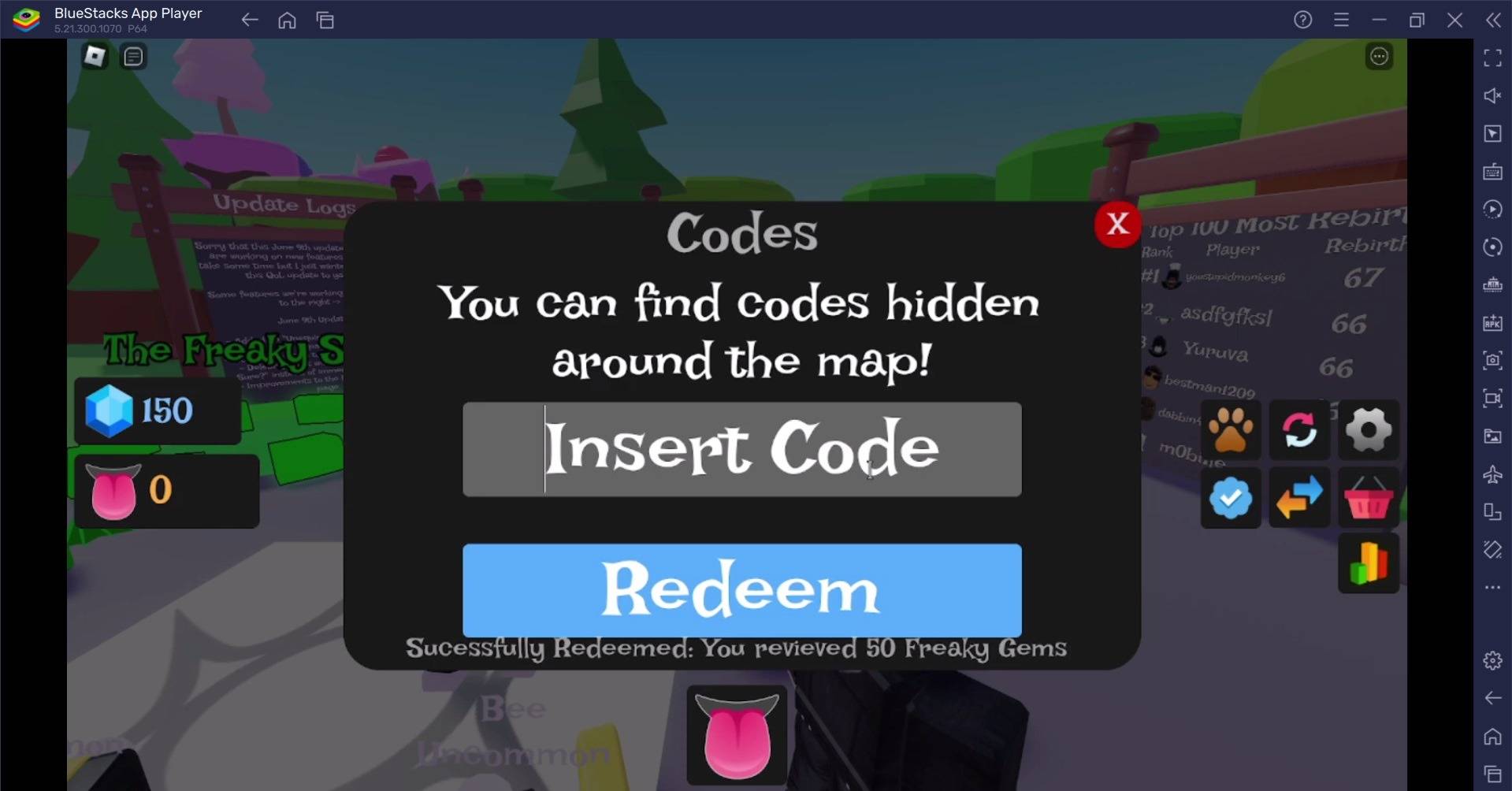
  1. Roblox で Freaky Simulator を起動します。
  2. 画面上で [コード] または [Twitter コード] ボタン (通常は Twitter の鳥のアイコンで示されます) を見つけます。
  3. ボタンをクリックしてコード引き換えウィンドウを開きます。
  4. 表示されているとおりにコードを正確に入力します (大文字と小文字が区別されます)。
  5. 「Enter」または「引き換え」を押して特典を受け取ります。

Freaky simulator roblox codes- All Working Redeem Codes January 2025

引き換えコードの問題のトラブルシューティング

コードが機能しない場合は、次の可能性を考慮してください。

  • タイプミス: エラーがないか再確認してください。コードでは大文字と小文字が区別されます。
  • 期限切れのコード: コードには有効期限があります。コードがまだ有効であることを確認してください。
  • 無効なコード: 信頼できるソースからのコードのみを使用してください。
  • アカウント制限: アカウント制限があるかどうかを確認します。
  • サーバーの問題: Roblox サーバーの問題により、コードの引き換えが一時的に妨げられることがあります。

ゲーム体験を強化するには、BlueStacks を使用して PC で Freaky Simulator をプレイすることを検討してください。

最新ニュース
As of now, there is no official confirmation that Microsoft has released a product called the

As of now, there is no official confirmation that Microsoft has released a product called the "ROG Xbox Ally" or that it is priced at $1,000. In fact, this information appears to be based on a misunderstanding or misinformation. Here's a clarification: 🎮 What Actually Exists: Xbox Series X|S and Xbox Game Pass: Microsoft continues to focus on its Xbox consoles and Game Pass subscription service as the core of its gaming ecosystem. ROG Ally: This is a gaming handheld developed by ASUS ROG (Republic of Gamers), not Microsoft. It was officially released in 2023 and is not an Xbox-branded device. ROG Ally Pricing (as of 2024): ROG Ally (64GB, base model): $499 ROG Ally (128GB, higher-end model): $599 ROG Ally (128GB, with additional features like enhanced cooling): Up to $699–$749 depending on region and retailer. 🤔 Why the Confusion? Some people mistakenly refer to the ROG Ally as "Xbox Ally" due to: Its ability to stream Xbox games via Xbox Cloud Gaming. Its strong focus on PC and Xbox Game Pass compatibility. The idea that Microsoft would release a $1,000 handheld (or sell a device under the "Xbox Ally" name) is not accurate, as Microsoft has not launched any handheld device under that name. ⚠️ Tariff Mention? There has been discussion about potential tariffs on electronics imported into the U.S. (especially from Asia), which could affect pricing for devices like the ROG Ally. However, Microsoft has not announced any new handhelds or price hikes tied to tariffs. ✅ Summary: ❌ No such thing as a "ROG Xbox Ally" exists. ✅ The ROG Ally is an ASUS product, priced starting at $499. ❌ Microsoft has not announced a $1,000 handheld gaming device. ✅ The ROG Ally can run Xbox Game Pass and stream Xbox games — but it’s not an Xbox product. If you're interested in a high-performance handheld gaming device, the ROG Ally remains a strong choice, but it’s made by ASUS — not Microsoft. Let me know if you'd like a comparison between the ROG Ally and other handhelds like the Steam Deck or Nintendo Switch OLED!

Warhammer 40Kアニメ化世界:漆黒の絶望の深淵を探究

Warhammer 40Kアニメ化世界:漆黒の絶望の深淵を探究