


Material Notification Shade
Category : PersonalizationVersion: v18.5.1
Size:24.00MOS : Android 5.1 or later
 Download
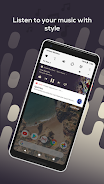
 Material Notification Shade is an app that brings features from Android Oreo to your notification center and allows for a ton of customization. It replaces your stock notification panel and provides a custom quick settings menu with gesture detection. The app includes stock themes, full color customization, powerful notifications (read, snooze, dismiss), quick reply for Android 5.0+ devices, automatic bundling of notifications, and notification card themes. The app also allows for customization of the quick settings panel including changing the background or foreground color, brightness slider color, and profile picture. Root access is optional but can grant access to control certain settings. The app uses the Accessibility Service API for a better user experience but does not collect personal information.
The Material Notification Shade app offers several advantages, including:
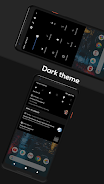
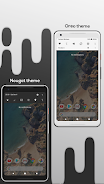
- Stock Themes: The app provides Nougat and Oreo-based themes, allowing users to choose the layout that best suits their preferences.
- Full Color Customization: Users have the ability to customize the color of all elements in the notification shade, making it personalized to their taste.
- Powerful Notifications: The app allows users to easily manage their notifications by providing options to get, read, snooze, or dismiss them.
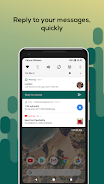
- Quick Reply: Users can reply to messages quickly as soon as they receive them, without needing to navigate away from the notification center. This feature is compatible with Android 5.0+ devices.
- Auto Bundled Notifications: Notifications from the same app are grouped together, making it easier for users to control and manage them.
- Notification Card Themes: Inspired by Android 8.0 Oreo, the app offers different notification card themes, including light, colored (using the notification's color as the background), and dark (blending notifications with a pure black background, ideal for AMOLED screens).
In addition to these advantages, the app also allows customization of the quick settings panel, such as changing the background/foreground color and the brightness slider color. Users can also choose their own profile picture to be displayed in the shade and change the quick settings grid layout. Root access is optional but can grant the app more control over certain settings. The app utilizes the Accessibility Service API to provide an enhanced user experience, without collecting any personal information or reading sensitive data from the screen.




RAID Shadow Legends: Mythical Champions Rankings

Elden Ring Nightreign Update 1.01.1: Solo Mode Enhanced, Bugs Resolved, Gameplay Balanced
- Alienware Area-51 Laptops Get First Price Cut 1 days ago
- Best Anime Like Cowboy Bebop 1 days ago
- Trump Tariffs Slam Nintendo, Sony Stocks 2 days ago
- Early Access Feedback on La Quimera 2 days ago
- 2025 Free Comic Day: Top 13 Reads 3 days ago
- Firebreak: The Year's Strangest Shooter - FBC 3 days ago
- Nintendo Sparks Zelda Wind Waker HD Switch 2 Speculation 3 days ago
- PS5 Sales Surge, Sony Reports 3 days ago
- Atlan's Crystal Game Debuts Globally on iOS, Android 3 days ago
-

Personalization / 1.0.0 / by DigitalPowerDEV / 11.10M
Download -

Video Players & Editors / v1.02 / by TateSAV / 13.80M
Download -

Lifestyle / 1.5 / by BetterPlace Safety Solutions Pvt Ltd / 9.60M
Download -

Productivity / 2.8 / 10.16M
Download




-
 All Passwords and Padlock Combinations in Lost Records: Bloom and Rage
-
 30 best mods for The Sims 2
-
 Tokyo Game Show 2024 Dates and Schedule: Everything We Know So Far
-
 Best Android PS1 Emulator - Which PlayStation Emulator Should I Use?
-
 Leaked Footage Unveils Mythical Epic: Black Myth: Wukong
-
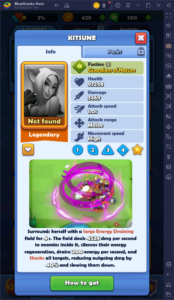 Top 10 Best Cards in LUDUS - Merge Battle Arena PvP