

 Download
 Rotation: A Comprehensive Screen Orientation Management App for Android
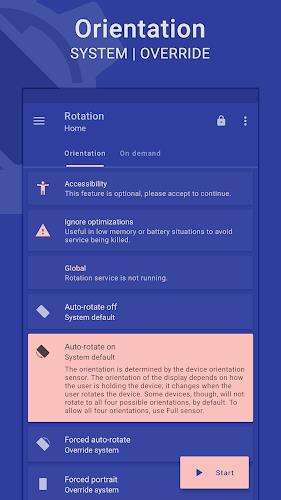
Rotation is a dynamic and customizable app that empowers Android users to take control of their device's screen orientation. With a wide array of orientation options, including auto-rotate, portrait, landscape, and reverse modes, users can easily configure the app to perfectly align with their needs.
Beyond basic orientation control, Rotation offers the ability to set specific orientations based on various events, such as incoming calls, device locking, headset connection, charging, and docking. This level of customization allows users to tailor their screen orientation to different scenarios, ensuring optimal viewing experiences.
Features of Rotation:
- Device screen orientation management: Rotation provides users with complete control over their Android device's screen orientation, allowing them to customize it according to their preferences.
- Wide range of orientation options: Users can choose from a variety of orientation modes, including auto-rotate on/off, forced portrait/landscape, reverse portrait/landscape, sensor portrait/landscape, and more.
- Customizable events and conditions: Rotation can be configured to automatically adjust the orientation based on different events and conditions, such as calls, headset connection, charging, dock usage, and specific app usage.
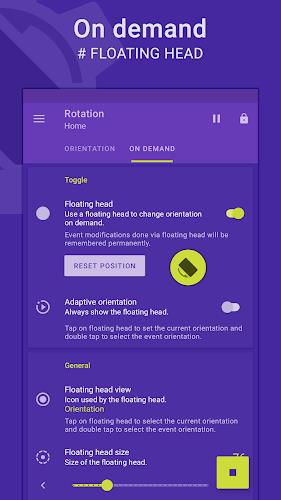
- Floating head feature: Rotation offers a customizable floating head, notification, or tile that appears on top of supported tasks, allowing users to quickly change the orientation of the foreground app or events.
- Dynamic theme engine: Rotation features a background-aware theme engine that ensures visibility and provides a visually appealing user experience.
- Additional features: Rotation includes functionalities like starting on boot, notifications, vibration, widgets, shortcuts, and notification tiles, as well as backup and restore options for saving and loading app settings.
Conclusion:
Rotation is a versatile and user-friendly app that empowers users to fully control and customize their device screen orientation. With a wide range of orientation modes, customizable events and conditions, and a handy floating head feature, this app provides a seamless and personalized user experience. The dynamic theme engine ensures visibility, and additional features like widgets, shortcuts, and backup options enhance the usability and convenience of the app. Download Rotation now to have complete control over your device screen orientation.




Elden Ring Nightreign Update 1.01.1: Solo Mode Enhanced, Bugs Resolved, Gameplay Balanced
Alienware Area-51 Laptops Get First Price Cut
- Best Anime Like Cowboy Bebop 22 hours ago
- Trump Tariffs Slam Nintendo, Sony Stocks 1 days ago
- Early Access Feedback on La Quimera 2 days ago
- 2025 Free Comic Day: Top 13 Reads 2 days ago
- Firebreak: The Year's Strangest Shooter - FBC 2 days ago
- Nintendo Sparks Zelda Wind Waker HD Switch 2 Speculation 2 days ago
- PS5 Sales Surge, Sony Reports 2 days ago
- Atlan's Crystal Game Debuts Globally on iOS, Android 3 days ago
- Pixel Starships 2 Launches Pre-Registration 3 days ago
-

Personalization / 1.0.0 / by DigitalPowerDEV / 11.10M
Download -

Video Players & Editors / v1.02 / by TateSAV / 13.80M
Download -

Lifestyle / 1.5 / by BetterPlace Safety Solutions Pvt Ltd / 9.60M
Download -

Productivity / 2.8 / 10.16M
Download




-
 All Passwords and Padlock Combinations in Lost Records: Bloom and Rage
-
 30 best mods for The Sims 2
-
 Tokyo Game Show 2024 Dates and Schedule: Everything We Know So Far
-
 Best Android PS1 Emulator - Which PlayStation Emulator Should I Use?
-
 Leaked Footage Unveils Mythical Epic: Black Myth: Wukong
-
 Top 10 Best Cards in LUDUS - Merge Battle Arena PvP