


iCut - Video Editor & Maker
Category : PhotographyVersion: 1.6.0
Size:155.97MOS : Android 5.1 or later
 Download
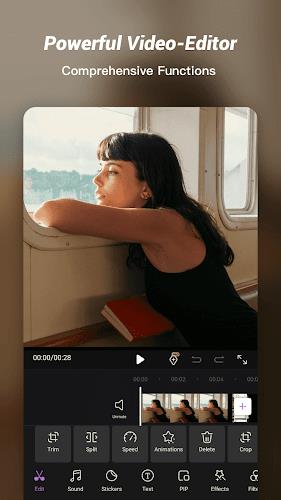
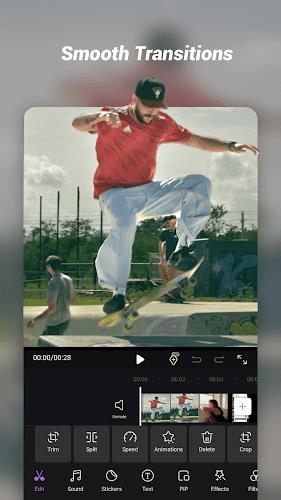
 iCut is an amazing video editing app that combines the power of AI with a wide range of features and effects to help you create stunning videos in no time. Whether you're a professional videographer or just looking to spruce up your social media posts, iCut has you covered. With this all-in-one editing tool, you can cut, crop, rotate, merge, split, add transitions, filters, stickers, texts, music, and so much more. It even has advanced functions like picture-in-picture and key frame animation to take your videos to the next level. Plus, with the ability to export in different formats and resolutions, you can easily share your creations on platforms like Youtube, Instagram, and Tiktok. iCut truly is a game-changer for video editing, making it quick, easy, and fun for everyone.
Features of iCut - Video Editor & Maker:
- Wide range of editing features: iCut offers a comprehensive set of editing tools, including cutting, cropping, rotating, merging, splitting, adding transitions, filters, stickers, texts, music, voice extraction, and more. Users can easily create amazing videos with these features.
- Versatile video editing: With the app, users can split and trim videos, cut unwanted parts, merge multiple videos, and adjust the video ratio. It also allows users to add custom watermarks and change the aspect ratio to fit various platforms like YouTube, TikTok, and Instagram.
- Advanced editing functions: It offers advanced functions like Picture-in-Picture (PIP) overlay, key frame animation, video reversal, speed adjustment, masking, and applying ready-made templates. These features provide users with more creative and dynamic editing options.
- AI-powered functions: It incorporates AI technology to provide additional functionalities like auto-smile, beauty camera, color restoration, auto-timelapse, and intelligent highlight identification. These AI functions enhance the editing experience and help users create impressive videos.
- Music and voice-over: It enables users to add audio effects, extract audio from videos, import local music, record dubbing and voice-overs, and adjust volume and fade effects. This allows users to enhance their videos with customized soundtracks.
- Stickers, texts, filters, and effects: iCut offers a wide variety of stickers, text fonts, filters, and effects to add fun, creativity, and visual appeal to videos. Users can choose from multiple options like emojis, animals, flowers, birthdays stickers, pre-set filters, and special effects like fire, snow, or glitch.
Conclusion:
Start creating impressive videos now by downloading iCut!





Elden Ring Nightreign Update 1.01.1: Solo Mode Enhanced, Bugs Resolved, Gameplay Balanced
Alienware Area-51 Laptops Get First Price Cut
- Best Anime Like Cowboy Bebop 1 days ago
- Trump Tariffs Slam Nintendo, Sony Stocks 2 days ago
- Early Access Feedback on La Quimera 2 days ago
- 2025 Free Comic Day: Top 13 Reads 2 days ago
- Firebreak: The Year's Strangest Shooter - FBC 2 days ago
- Nintendo Sparks Zelda Wind Waker HD Switch 2 Speculation 2 days ago
- PS5 Sales Surge, Sony Reports 3 days ago
- Atlan's Crystal Game Debuts Globally on iOS, Android 3 days ago
- Pixel Starships 2 Launches Pre-Registration 3 days ago
-

Personalization / 1.0.0 / by DigitalPowerDEV / 11.10M
Download -

Video Players & Editors / v1.02 / by TateSAV / 13.80M
Download -

Lifestyle / 1.5 / by BetterPlace Safety Solutions Pvt Ltd / 9.60M
Download -

Productivity / 2.8 / 10.16M
Download




-
 All Passwords and Padlock Combinations in Lost Records: Bloom and Rage
-
 30 best mods for The Sims 2
-
 Tokyo Game Show 2024 Dates and Schedule: Everything We Know So Far
-
 Best Android PS1 Emulator - Which PlayStation Emulator Should I Use?
-
 Leaked Footage Unveils Mythical Epic: Black Myth: Wukong
-
 Top 10 Best Cards in LUDUS - Merge Battle Arena PvP